Kubernetes moves fully to cgroup v2: what you need to know
In this article
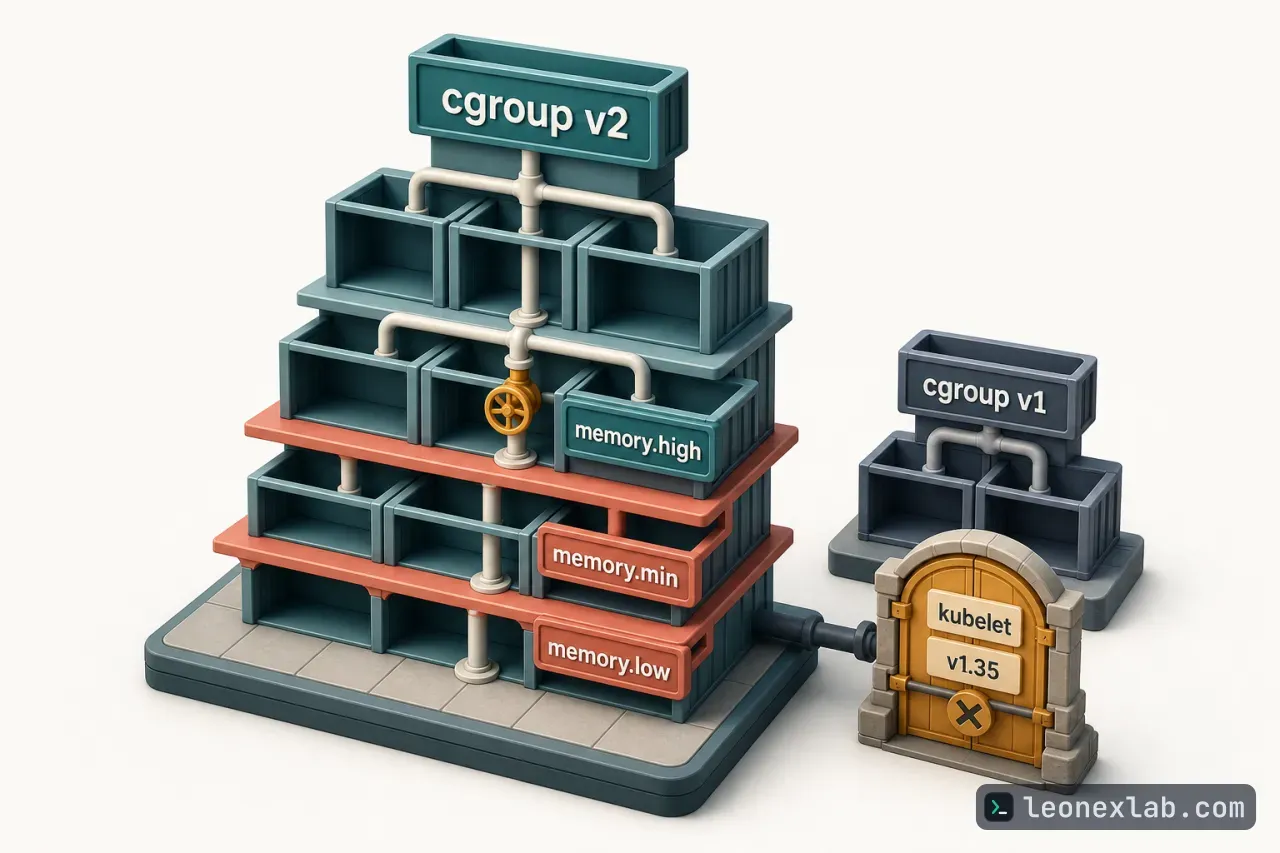
cgroups (control groups) is a Linux kernel feature for managing system resources, and Kubernetes relies on it to allocate CPU and memory to containers so that applications do not interfere with one another. Cgroup v1 is now deprecated: starting with Kubernetes v1.35, the kubelet by default does not start on nodes using cgroup v1. This article summarizes why you should move to cgroup v2, the improvements that come with it, the requirements for adopting it, and useful commands for checking.
Cgroup v1 end-of-support timeline
Starting with Kubernetes v1.31, support for cgroup v1 management moved to maintenance mode, while cgroup v2 has been stable since Kubernetes v1.25. Compared with v1, cgroup v2 has a single unified hierarchy, a more consistent interface, and a stronger foundation for resource isolation and modern resource management features.
Starting with Kubernetes v1.35, the failCgroupV1 option defaults to true, so the kubelet does not start on cgroup v1 nodes. Administrators can temporarily set failCgroupV1: false in the kubelet configuration file, but removal will follow Kubernetes' deprecation policy. The next removal work is tracked in KEP-5573. In Kubernetes 1.36, cgroup v1 remains a fallback and is scheduled for removal in Kubernetes v1.38.
What action to take depends on the version you are running:
For versions older than v1.35: move all Linux nodes to cgroup v2 before upgrading, or plan to use failCgroupV1: false temporarily.
For v1.35 and later: confirm that all Linux nodes run cgroup v2, or deliberately keep the override configuration. With the default configuration, any remaining cgroup v1 nodes will fail as soon as the kubelet starts.
For clusters managed by kubeadm: the SystemVerification preflight check returns an error in kubeadm init, kubeadm join and kubeadm upgrade when it detects cgroup v1 together with kubelet v1.35 or later; with older kubelets it is still only a warning.
Limitations of cgroup v1 and improvements in cgroup v2
Memory QoS appeared as alpha in Kubernetes v1.22, was updated in v1.27 and is still alpha in v1.36, but it now separates memory throttling from memory reservation and adds tiered memory protection. This feature is available only on Linux nodes using cgroup v2 because it depends on the cgroup v2 memory controller: memory.high for throttling, and memory.min and memory.low for hard and soft protection when tiered reservation is enabled. Cgroup v1 cannot provide this protection model.
Enabling the MemoryQoS feature gate applies memory.high to Burstable containers; the threshold is calculated from the request, the limit and memoryThrottlingFactor (default 0.9).
memoryReservationPolicy: None is the default and does not write memory.min or memory.low.
memoryReservationPolicy: TieredReservation maps the memory request of Guaranteed Pods to memory.min (hard protection) and that of Burstable Pods to memory.low (soft protection); BestEffort Pods get no protection.
The kubelet exposes Alpha metrics for the total memory.min and memory.low reserved on the node.
Kernel 5.9 or later is recommended; on older kernels, memory.high reclaim can cause a known livelock, and from v1.36 the kubelet logs a warning when Memory QoS is enabled on an affected kernel.
Example configuration to enable tiered protection:
apiVersion : kubelet.config.k8s.io/v1beta1
 kind : KubeletConfiguration
 featureGates :
 MemoryQoS : true
 memoryReservationPolicy : TieredReservation
 memoryThrottlingFactor : 0.9
Kubernetes recommends not enabling Alpha features in production. If you still find tiered reservation useful for your platform, test the configuration and account for the amount of memory that will be hard-reserved before enabling it.
As for OOM handling, on cgroup v2 nodes the kubelet defaults singleProcessOOMKill to false. As a result, memory.oom.group is set on each container's cgroup, and when an OOM occurs all processes in the container are killed together, rather than leaving a multi-process container half-working. Set singleProcessOOMKill: true only if you need cgroup v1-compatible behavior, where the kernel may kill processes one at a time. This behavior is limited to the container's cgroup, not the whole Pod. In addition, cgroup.kill is a separate administrative interface: writing 1 to it sends SIGKILL to all processes in the cgroup and its child cgroups, and it does not configure OOM behavior. The cgroup v2 memory controller also provides memory.events counters for monitoring systems and userspace OOM managers to observe.
Other improvements that come with cgroup v2
Rootless: with cgroup v1, delegating controllers to low-privilege containers can be dangerous; cgroup v2 supports formal delegation, and most rootless container deployments rely on systemd to delegate v2 controllers to non-root users. This mechanism is separate from Pod user namespaces, which became stable in Kubernetes v1.36 and have filesystem, kernel, CRI runtime and OCI runtime prerequisites that need to be checked.
eBPF: the cgroup v2 device controller has no interface files and is built on cgroup BPF. Cilium attaches cgroup BPF programs for socket-based load balancing, with the cgroup root defaulting to /run/cilium/cgroupv2.
Pressure Stall Information (PSI): reports the level of CPU, memory and I/O contention at the node, Pod and container level. On supported clusters, the kubelet enables PSI by default (KubeletPSI is stable and locked on). PSI requires cgroup v2, Linux 4.20 or later, CONFIG_PSI=y and a kernel not booted with psi=0; the data is available through the Summary API and /metrics/cadvisor.
CPU weight conversion: cgroup v1 uses cpu.shares while cgroup v2 uses cpu.weight. Newer OCI runtimes use an improved non-linear conversion that preserves the default priority level and gives small CPU requests finer, more usable granularity. The change is in the OCI runtime rather than Kubernetes, and is in crun v1.23 and runc v1.3.2; after upgrading the runtime, monitoring tools or policies that predict the exact cpu.weight value may need to be updated.
In-place resource updates: in-place Pod vertical scaling became stable in Kubernetes v1.35; in v1.36, this feature for Pod-level resources is enabled by default at Beta level. The kubelet coordinates changes between Pod-level and container-level cgroups, and cgroup v2 is required for correct aggregate enforcement.
During the transition, software that reads the cgroup filesystem directly needs to be updated. The migration guide recommends cAdvisor v0.43.0 or later and lists compatible versions of Java, Node.js and automaxprocs.
Requirements for adopting cgroup v2
You need to use a Kubernetes version that supports cgroup v2 management; this support has been stable since v1.25 and is in all currently supported releases. The specific requirements:
At least one Linux node, since cgroups are a Linux-only concept.
The operating system must run with cgroup v2 enabled.
Kernel 5.8 or later (5.9 or later recommended when using Memory QoS).
A container runtime that supports cgroup v2: containerd v1.4 or later (use containerd v2.0 or later to automatically detect the cgroup driver) or CRI-O v1.20 or later.
The kubelet and the container runtime must both be configured with the correct cgroup driver.
On kernel history: when Kubernetes launched in 2014, only cgroup v1 existed. Cgroup v2 first appeared in Linux 4.5 in 2016 with the io, memory and pids controllers; Linux 4.15 added the cpu controller and PSI began with Linux 4.20. The project does not recommend using cgroup v2 with kernels older than 5.2 because of missing cgroup-level task freezer support. The stated minimum is 5.8, because the system-level cpu.stat file of the root cgroup was added in Linux 5.8. The fix for the memory.high livelock affecting Memory QoS arrived in Linux 5.9, and memory.peak was added in Linux 5.19.
apiVersion : kubelet.config.k8s.io/v1beta1
 kind : KubeletConfiguration
 cgroupDriver : systemd
Tools and commands for checking and debugging
stat -fc %T /sys/fs/cgroup/ : check whether cgroup v2 is enabled; a result of cgroup2fs means it is enabled.
systemctl list-units 'kube*' --type=slice or --type=scope : list the Kubernetes-related units that systemd is holding in memory.
bpftool cgroup list /sys/fs/cgroup/* : list the programs attached to cgroups.
systemd-cgls /sys/fs/cgroup/* : recursively display the contents of control groups.
systemd-cgtop : see the control groups using the most resources.
tree -L 2 -d /sys/fs/cgroup/kubepods.slice : view the cgroup directories related to Pods.
To check whether a Pod's CPU or memory limits have been applied to the cgroup files, it is best to work from the API object down to the node. First identify the node, then compare the desired resources in the spec with the applied values in the status, because in-place resize can make the two diverge:
kubectl get pod <pod-name> -n <namespace> \
 -o jsonpath = '{.spec.nodeName}{"\n"}'
On that node, with root privileges, the systemd cgroup driver and cgroup v2 (jq is also needed), use the kubelet's labels to identify the right container, because a container name alone is not unique on a node; use crictl ps -a if the container is not running:
CONTAINER_ID = $( crictl ps \
 --label io.kubernetes.pod.namespace = <namespace> \
 --label io.kubernetes.pod.name = <pod-name> \
 --name <container-name> -q | head -n1 )
Then read the container's cgroup files, including cpu.weight, cpu.max and memory.max. The cpu.max value gives the CPU limit as quota and period, while memory.max gives the memory limit; when MemoryQoS is enabled there are also memory.high, memory.min and memory.low. Do not treat info.runtimeSpec.linux.cgroupsPath as a filesystem path when the runtime uses the systemd driver, because that is a systemd unit path, not a directory under /sys/fs/cgroup.