Stabilizing apps at scale with layered defense
In this article
Why mobile crashes are expensive and hard to predict
On Android alone, the app has millions of lines of code, and many engineers contribute code to each release on a weekly cycle. Every week brings a large number of merge requests from many product teams, and quite a few features sit behind feature flags (toggles that switch on and off independently of the release). Any change can cause a crash. Usually the stack trace points straight to the change and the team responsible; the hard case is a crash with no usable stack trace, such as a native crash missing debug symbols, where you have to cross-reference the release milestone, the flag schedule and session metadata.
The cost on mobile is also higher than on web. A web fix ships in minutes, while a released crash stays on users' devices. Not everyone has auto-update turned on, so until a force update arrives, some users may run the faulty build for months. Crashes degrade the experience, drag down the crash-free session rate and can affect Google Play ranking. If a crash is severe enough to need a hotfix, the team must also prepare an out-of-cycle build, taking time away from planned work.
Prevention: lint and multiple layers of testing
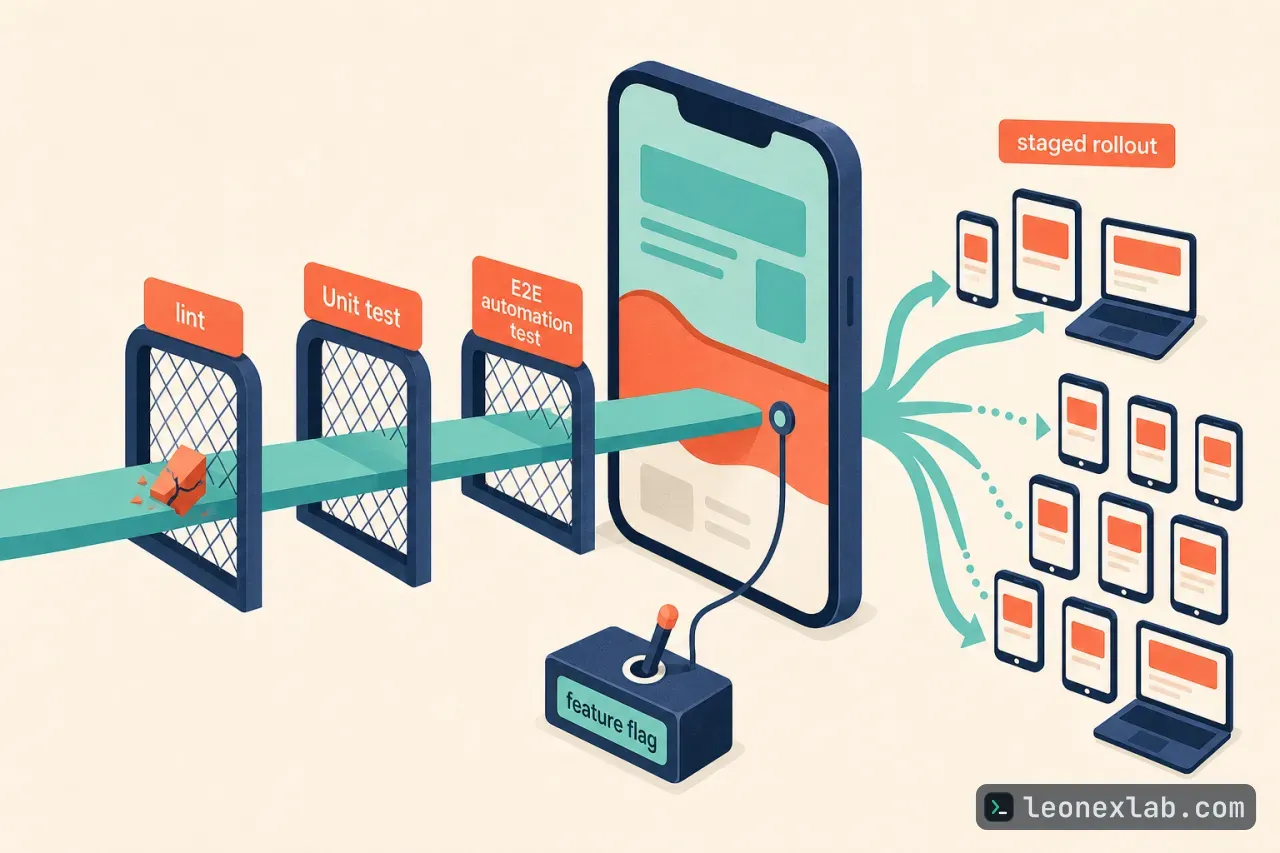
Lint is the cheapest layer: static analysis that flags unsafe code patterns, API misuse and crash risks before the code runs. Android uses Android Lint and iOS uses SwiftLint; both run in CI on every merge request, and high-severity findings block the merge. Pre-existing issues do not block a merge request: Android records them in a lint baseline, while SwiftLint on iOS only reports the lines the merge request changes. As a result, a merge request fails only because of findings it introduces itself.
Lint rules come from three sources:
Custom rules matter even more as AI-assisted programming grows. An assistant can write code that looks correct overall without knowing which patterns have crashed the app before. Custom rules turn those lessons into checks that apply equally to hand-written and AI-generated code. Lint regularly blocks merge requests carrying Fatal-level errors, the kind that usually crash the app immediately or stop it from running.
Unit tests: verify the correctness of business logic at the function and class level, catching logic bugs before merge.
UI component tests: verify the rendering and interaction of individual UI components, catching crashes caused by render errors or state mismatches; like unit tests, they run before merge on every merge request.
E2E automation tests: safeguard critical user journeys, running on each team's schedule and on every release train.
QA manual testing: exploratory testing on real devices for new features and major changes, plus a full regression pass on every release, catching edge cases that automation misses.
Release gates: GEA, staged rollout and feature flags
Grab Early Access (GEA) is Grab's early-access build, serving as a mandatory quality gate in each release cycle, running for one week before production. GEA builds are monitored for crashes continuously; new crashes appearing during this period automatically create tickets assigned to the responsible team, and issues reported by internal users, including functional bugs, are ticketed the same way. Teams must resolve all blocking issues before the release advances to production. The GEA user base is large enough to expose real-world edge cases that automated tests miss, but small enough that problems are contained before reaching production users.
When a release enters production, it meets the real-world diversity that internal test environments cannot simulate: thousands of device models, OS versions, carrier configurations and usage habits. Two mechanisms operate at this gate: staged rollout monitoring to limit the blast radius, and feature flags to decouple feature activation from deployment.
Each release is opened up gradually over about a week, starting with a small percentage of users and expanding step by step. A dedicated monitor tracks the new version's crash rate separately, because a regression in a new build can be masked in aggregate figures when stable older versions make up the majority. If the crash rate is abnormal at any point, the system automatically pauses the release; the rollout resumes only after the responsible team reviews and explicitly confirms. This way a regression affects only a small share of users instead of spreading to everyone.
In recent months, many Android rollouts were paused for on-call review. Most resumed after investigation: either the signal turned out to be noise, or the crash sat behind a feature flag that could be turned off without a new build. A small number stopped at an early stage until a hotfix was ready. The monitor is deliberately tuned to be sensitive, because a paused rollout costs only a few hours to resolve, while a missed regression can cost weeks.
As for feature flags, every significant new feature ships behind a flag. This allows gradual rollout, tracking the crash rate at each step and turning the feature off immediately if the crash rate exceeds the threshold, without waiting for the next release cycle. For a team releasing weekly, the kill switch is what allows fast iteration while staying safe, and it is the first lever to pull once an incident reaches production.
Responding when a crash slips into production
No preventive layer is perfect. A misconfigured remote flag can open up an unexpected code path, a device manufacturer's OS update can change system behavior, or a bug can appear only with a particular combination of device state and user action. At that point the goal shifts from prevention to containment, prioritizing speed of detection, stopping the bleeding and accuracy of diagnosis.
Grab monitors the crash rate in real time across all active versions, with two complementary signals that can trigger an on-call alert:
The two signals catch different kinds of failure. A hard threshold catches slow drift: if each release nudges the crash rate up a little, every step looks normal against the recent baseline, but after a year the rate may have risen silently. A trend alert catches the opposite case, a sudden regression, early, before it grows large enough to cross the threshold.
When a signal fires, the on-call engineer is notified immediately, reviews the Firebase Crashlytics report to identify the crashes causing the anomaly, then calls the team that owns the affected area. The team then follows a three-step decision framework, from cheapest to most expensive:
Turn off the relevant feature flag. If the crash is tied to a feature behind a flag, turning off the flag immediately stops new users from hitting the bug without needing a new build, and it is the fastest mitigation.
Apply a server-side fix. If no flag covers the affected code path, the team looks for server-side levers such as updating an API response, changing a configuration value or throttling a backend dependency; changes that take effect without a new app build are preferred.
Ship a hotfix. If neither approach is feasible, the team considers whether to do an out-of-cycle hotfix, based on these criteria: the business criticality of the affected flow, the severity of the crash, the impact on users and the time until the next scheduled release. A post-mortem is mandatory after a hotfix.
A post-mortem does more than record what went wrong; it also settles concrete actions to close gaps in the prevention layers, such as adding a lint rule that blocks the same code pattern, putting a similar feature behind a flag or improving test coverage for the affected code path.
Automated triage and deep observability
Automatic ticket creation at GEA and production is a single triage pipeline that follows the release from GEA into production. In production, running in parallel with real-time monitoring, the pipeline creates tickets for crashes exceeding a minimum threshold. Crashes are assessed by type, user impact and actionability; sporadic, device-specific crashes that teams cannot act on are tracked but do not get tickets. For eligible crashes, a ticket is routed to the owning team with an SLA by severity: Urgent, High, Medium or Low. The initial priority is set automatically from the crash rate and user impact, and teams can adjust it based on the business criticality of the feature.
Firebase Crashlytics is the primary crash monitoring tool, but some crashes are hard to diagnose: unusable stack traces, native crashes from third-party libraries missing debug symbols, or bugs that appear only on specific device configurations. Grab handles this in two ways. First, it uses Crashlytics' BigQuery export feature to own a copy of the crash data, pseudonymized and processed under Grab's data protection policy. This copy allows SQL queries over device attributes, app versions and session metadata to reveal patterns that individual reports do not show, and to build internal dashboards broken down by crash type, device tier or version.
Second, each crashed session is enriched with custom metadata attached directly to Crashlytics. The three most useful attributes:
Together with structured logs and breadcrumbs, these attributes form the event trail leading up to a crash, often the only meaningful signal when the stack trace is not enough.
Key takeaways
App stability is the cumulative result of layered defense: lint and tests block bad code at the merge gate, QA and GEA catch what slips through, staged rollout limits the blast radius, and on-call plus automated triage close the loop on what production exposes.
The common principle across every layer is shift-left: the earlier a crash is caught, the cheaper, smaller and less disruptive it is to fix.
When responding, the order of priority runs from cheapest to most expensive: turn off the feature flag, fix server-side, and only then hotfix, and every hotfix must come with a post-mortem to tighten the prevention layers.
For hard-to-diagnose crashes, data exported to BigQuery and custom metadata on Crashlytics provide clues when the stack trace is not enough.
AI makes code get written faster; layered defense is what makes that speed safe, and stability does not mean no open issues remain but knowing which issues you own and which you are tracking.